
01
The counter menu
Coffee and pastry boards in portrait or landscape — the templates are designed to be readable from the ordering line, and the readability checker proves it before you publish.
Solutions · Cafés
The chalkboard charm without the chalk: update the soup, 86 the croissants, and flip to the afternoon board — from your phone, mid-rush. Runs on any TV, free for one screen.
A finished café screen
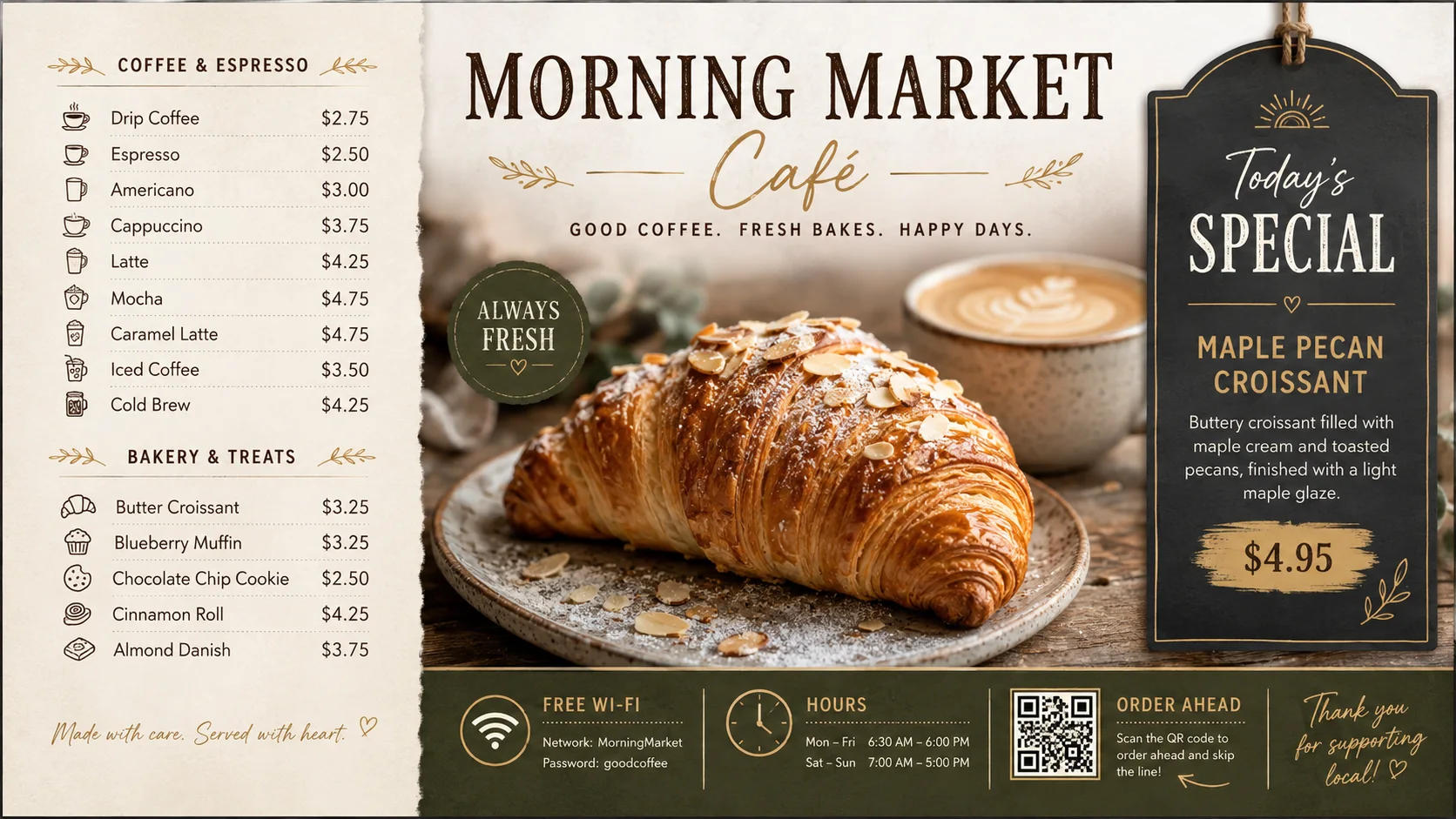
Coffee and pastry boards in portrait or landscape — the templates are designed to be readable from the ordering line, and the readability checker proves it before you publish.
Whatever baked this morning is today's menu. Edit two lines from your phone while the first pot brews; the board updates before the doors open.
When the last muffin goes, flag it once and the board dims or hides it. Regulars stop asking; the line keeps moving.
A second scene promotes the bags of beans and gift cards that actually grow a café. Rotate it in every 30 seconds — no second TV required.
Open-mic Thursday, the book club, the fundraiser poster — a scrolling announcement ticker and QR codes handle the bulletin board that used to eat your counter wall.
A QR widget for the Wi-Fi or mobile ordering sits in the corner of any board, sized to scan from the line. Free plan includes it.
One venue day
Scenes switch using the venue timezone and travel with the cached release, so the daypart logic keeps working offline.
Scheduling details →Photograph the printed menu and preview it as a board — free, no account.
Read more →Make sure your drink list is legible from the queue before you hang the TV.
Read more →The three-step guide — design, connect, update from your phone.
Read more →An old laptop or mini PC behind the counter is all the hardware you need.
Read more →One screen is the most common café setup, and it's exactly what the free plan covers: one live screen, forever, with a small watermark. No card, no trial clock.
Yes — portrait boards are first-class (there's a café portrait template built in). Set the aspect when you create the board and the editor canvas matches your mounted TV.
Because the daily case, the sold-out flags, and the afternoon flip change every day. The price list is the boring part; the living part of the menu is what a board earns its keep on.
A TV you already own plus a $30 Fire TV Stick, or any old laptop running the browser player. Software free on one screen — total new spend can be under $40.
Try the editor with no account — there's a café template waiting, and a demo menu you can make your own.
Try the editor — no account neededFree plan includes one live screen. No credit card. No trial clock.